
Remember document expiries
Store passports, IDs, driving licences, insurance policies, and visas with masked numbers, photo attachments, and clear status labels.
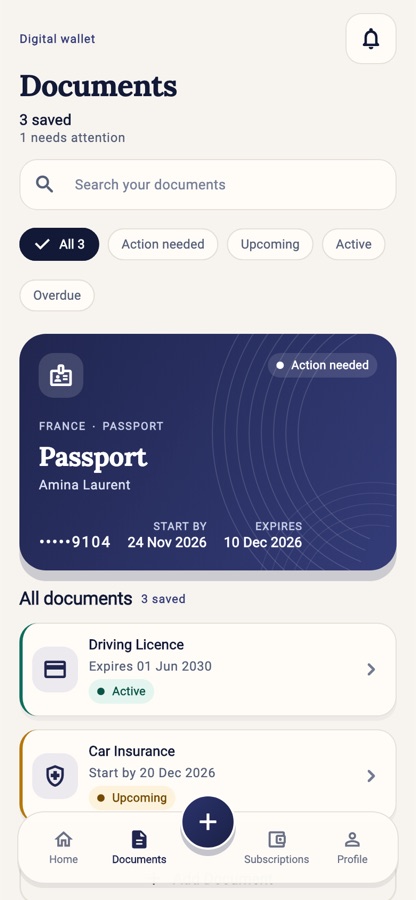
Local-first personal registry
Keep passports, insurance policies, IDs, and recurring subscriptions in one calm place—with on-device reminders before important dates arrive.
Android public listing coming soon. No account or cloud sign-up required.
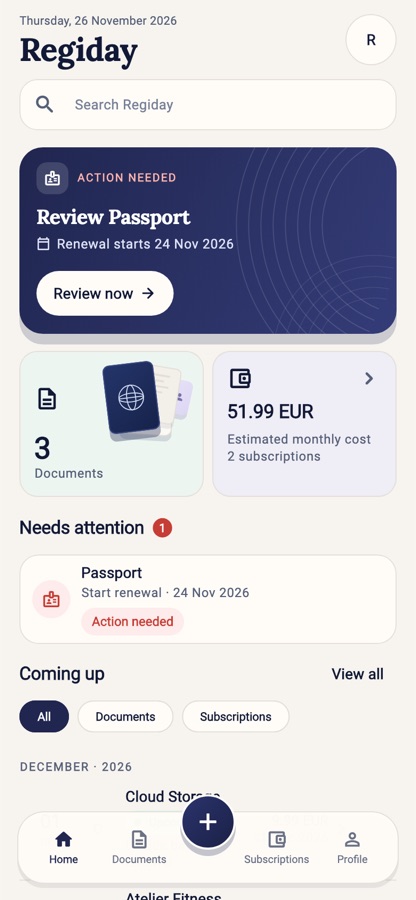
Built for real deadlines
Designed like a tidy paper wallet: see what needs action first, open the record in one tap, and keep sensitive scans on your own device.
Store passports, IDs, driving licences, insurance policies, and visas with masked numbers, photo attachments, and clear status labels.
Set a renewal start date ahead of the expiry date so you have time to book appointments, gather paperwork, and receive local reminders at 9:00.
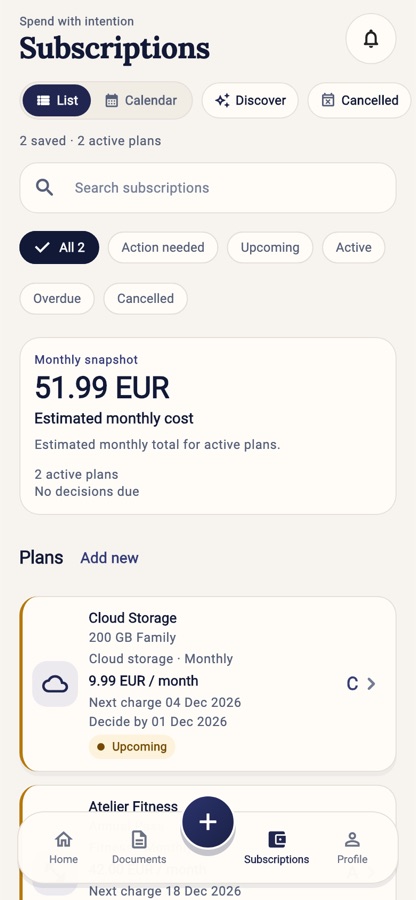
Track recurring charges across currencies with a monthly estimate, decide-by reminders before renewal, and a renewal calendar.
How it works
Use the guided form to enter a document or subscription manually, or optionally scan photos with Gemini AI and review every field before saving.
Choose when you want to start renewing or decide before a charge. Regiday schedules local device notifications 30 days, 7 days, 1 day, or on the day itself.
Protect the app with biometrics or passcode, and export a
password-encrypted .rgry backup whenever you want
an offline copy.
Privacy by architecture
Regiday has no user account, no cloud document database, and no hidden sync. Everything you save lives in local SQLite storage on your phone.
Documents, renewal history, attachments, and subscriptions are stored directly in your device's app storage.
Document photos are sent to Gemini via Firebase AI Logic only when you explicitly tap Scan all images. Nothing is saved until you review and confirm.
Lock Regiday behind Face ID, Touch ID, fingerprint, or device passcode and hide screens in the Android app switcher.
Export an AES-256 password-encrypted archive to Files, Drive, or local storage. Regiday never sees or stores your backup password.
Questions
No. Regiday works completely offline without registration. When
switching devices, export an encrypted .rgry backup
from Profile and import it on your new phone.
The free plan includes up to 10 documents and 5 subscriptions with reminders, app lock, scanning, and encrypted backups included. Regiday Pro is planned as a one-time upgrade—not a subscription—to remove record count limits on your device.
No. Regiday tracks your plans, billing cycles, and decide-by dates locally so you can review or cancel directly with each provider before renewal.
Regiday supports English, French, and Arabic (including native right-to-left layout).